
Top 7 VisualEyes™ 3.2 features for researchers
For Research Module users, VisualEyes 3.2 includes significant improvements, furthering your possibilities to perform advanced vestibular research.
Below, we’ll explore the top 7 features that make VisualEyes 3.2 an ideal vestibular research solution.
1. Blinking fixation light
You can cue your patient’s eyes with a blinking fixation light to bring their eyes to primary gaze during testing. For this purpose, you will see an additional button in VisualEyes 3.2 (lightbulb) on the toolbar above the cameras.
2. Adjust the duration of caloric irrigations for each temperature
In VisualEyes 3.2, you can now adjust the duration of each temperature. So, if you've ever wondered whether duration makes a difference, now you've got the ability to test it on your research subjects so that you can better serve your patients in the clinic.

3. Optokinetic test adjustments
During optokinetic testing, you can change the speed and direction of the test in real-time. These adjustments only impact the stimulus, with no additional measurement or analysis completed.

4. Keyboard marker
Some clinicians prefer the ability to mark an external stimulus (such as an auditory masker or goggle cover taken off) on their oculomotor tests to signal why a change in eye movements or pupil diameter may have occurred.
You can use the keyboard letter “m” to place a marker on the eye tracing graph. To add a marker to the tracing, press the “m” key on the keyboard. This will add a black vertical line to the eye tracing graph. You can add as many markers as you want during a recording. This keyboard marker will be present on the eye tracing graph upon reviewing or printing results.
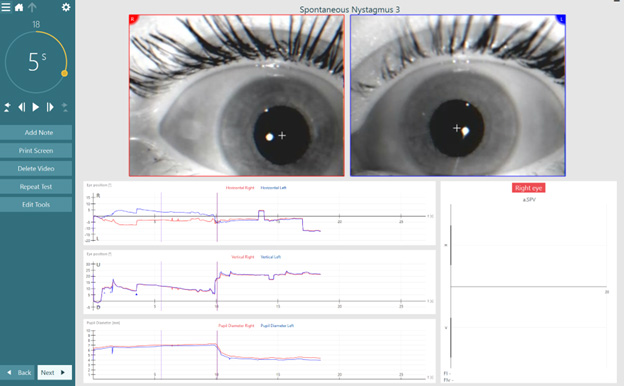
The keyboard marker function is active in the following VisualEyes tests:
| Oculomotor assessments | Positional tests | Rotational assessments | Other tests |
| Spontaneous Nystagmus | Dix-Hallpike | Sinusoidal Harmonic Acceleration | VORTEQ™ Active Head Rotation |
| Gaze | Advanced Dix-Hallpike | Step Velocity | SVV Static |
| Smooth Pursuit | Positional | Visual VOR | SVV |
| Self-Paced Saccades | Lateral Head Roll | VOR Suppression | Caloric |
| Random Saccade | Ocular Counter Roll | ||
| Saccadometry | |||
| Optokinetic |
You can also export the keyboard marker data. A keyboard marker file will be present in every test file and if you have used this function, the time points will be displayed in the Excel document.
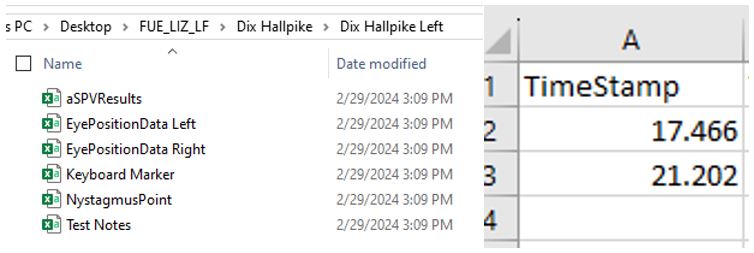
5. Pupillometry
We’ve switched the measurement parameter in the Pupil Diameter function from pixels to millimeters, offering more clinically useful information for Pupillometry.

You can also click Edit Tools > ‘+’ sign to add points to the Pupil Diameter graph to get exact measurements of the pupil size at any point during the recording.
6. Exact degree of head position
Our 3D head model (used in Advanced Dix-Hallpike and Lateral Head Roll testing) now includes exact degree of head position for accurate testing.

7. Measure rebound nystagmus
You can turn on an ‘Extend End of Recording” feature in gaze testing, which will allow the stimulus to return to center for measuring any rebound nystagmus.

Advancing vestibular research with VisualEyes
These are just some of the possibilities to use VisualEyes for vestibular research. To learn more, please discover VisualEyes 3.2.

